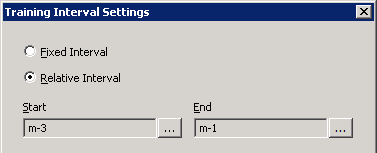
Configuring Training Interval Settings
Use the Training Interval Settings dialog box to configure the hourly historic training intervals in the past over which all historical data, gas load as well as input data, must exist in order to execute the training process. Training intervals may be specified as a fixed interval or for a time interval that is relative to the current date and time.
Additionally, you can specify the quantity and sampling method for choosing the subset of historical data used for training.
To Configure Training Interval Settings
- Click the Neural Nets page of the ELF Editor.
- Add a New Child or New Sibling, or double-click to Edit a configured template or definition.
- Configure the settings as described in Configuring Neural Network Template Settings or Configuring Neural Network Definition Settings.
- Click Add… or Edit… for a Training Hourly Interval to view the Training Interval Settings dialog box.
- Configure the settings using the properties described below.
|
Training Interval Settings |

The properties on the Training Interval Settings dialog box are described below.
| Parameter | Description | |
|---|---|---|
|
Fixed Interval |
Select to identify a fixed training interval. |
|
|
Relative Interval |
Select to identify a relative training interval. Note: All relative times will be resolved to the local time of the location where the ELF device and services are running. |
|
|
Start |
Click Start to configure start date and time for the training interval:
|
|
|
End |
Click End to configure the end date and time for the training interval:
|
|
|
Selection Method |
Configure the quantity and selection method for the historical data used for the training interval. The selection method is either Linear sampling (Forward or Backward) or Random sampling. |
|
|
Percentage of Interval |
Specify a percentage value to indicate the how much of the available historical data in the time interval to be sampled. Specify 100% for all historical data in the time interval to be used for training. |
|
|
Linear Forward |
Select to sample the data from the beginning of the time interval. Starting at the beginning of the time interval, hourly values will be iterated in a linear fashion until the target percentage of data has been sampled. |
|
|
Linear Backward |
Select to sample the data from the end of the time interval. Starting at the end of the time interval, hourly values will be iterated in a linear fashion until the target percentage of data has been sampled. |
|
|
Offset Percentage |
If Linear sampling is specified, specify a starting time offset from the beginning or end of the specified historical time interval. |
|
|
Random |
Select to sample the data using a Random method. Hourly values will be randomly chosen until the target percentage of data has been sampled. |
|
|
Arbitrary Seed |
If Random sampling is specified, select Arbitrary Seed to select a true random selection of data points. |
|
|
Seed Value |
If Random sampling is specified, select a Seed Value to use a specific random seed to make for a distributed but reproducible selection of data. |